Viewer Rules
The maximum number of series that can be opened at once via the dedicated VisioVIEW DICOM viewers can be modified by changing the value in the corresponding input field. Setting this value to 0 means that there is no limit to the number of series that can be opened simultaneously in the viewers. If the number of requested series exceeds this limit, the user is prompted to confirm the open request. The default value is 50.

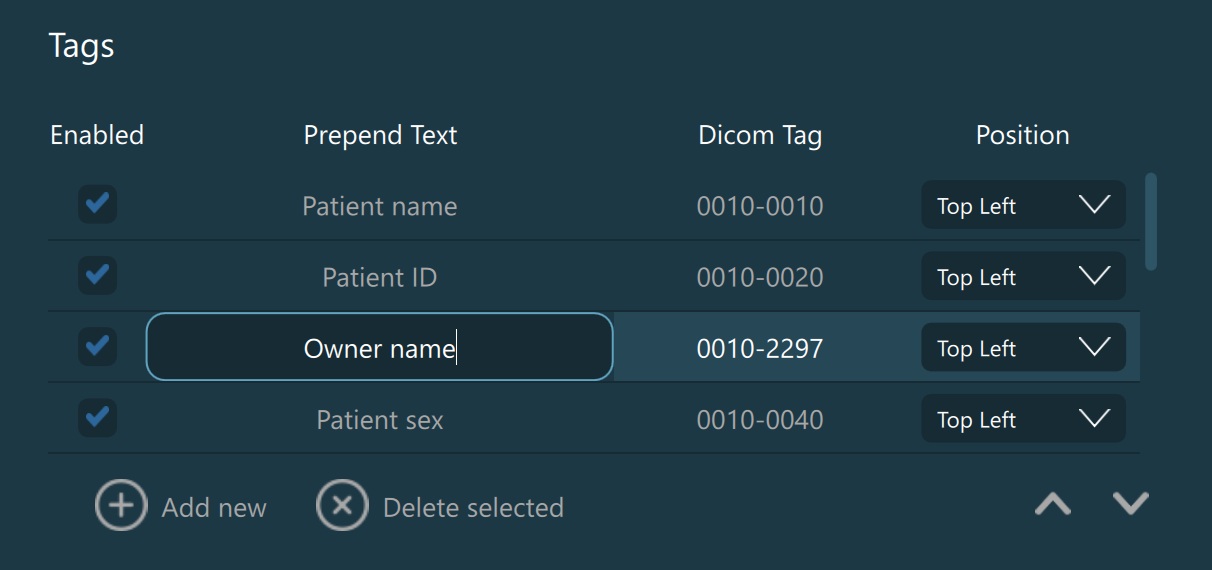
The Viewer Rules define the annotations and information displayed on images within the Viewer. Users have the ability to enable/disable, add, modify, reorder, and delete annotations based on selected DICOM tags. To mark an annotation as selected,
simply press the specific row you want to select. To deselect an annotation, hold the CTRL key and press the selected row from the list.
Enable/disable the visibility of annotations on images by toggling the Enabled checkbox next to each Viewer rule.
The Prepend Text and DICOM Tag parameters are connected together and form the annotation displayed on the image. The value of the Prepend Text parameter is attached before the value of the specified DICOM tag for that Viewer rule.
Apply the desired position of that annotation on the image by choosing an option from the Position dropdown (Top Left, Top Right, Bottom Left, Bottom Right).
To modify the
Prepend TextorDICOM Tagparameters, mark the field as editable by double-clicking on it. Press theEnterkey or press outside of the field to stop editing.Add new: Adds a new Viewer rule at the end of the list. Modify the default values by following the steps above.
Delete selected: Removes the selected Viewer rule from the list.
Reorder and customize how the annotations are displayed on the images by using the
Move upandMove downarrows.